Using packages
Centreon Map 4 Server
Warning
If you are running a 4.0.X version and are about to upgrade to a 4.2.X version, you have to install and run the server in version 4.1.X first
On the Centreon Map 4 server.
Update component
# yum update centreon-map4-server
Start Tomcat 6
# service tomcat6 start
Centreon Map 4 Web client
On the Centreon server.
Update component
# yum update centreon-map4-web-client
Conclude update via Centreon web interface
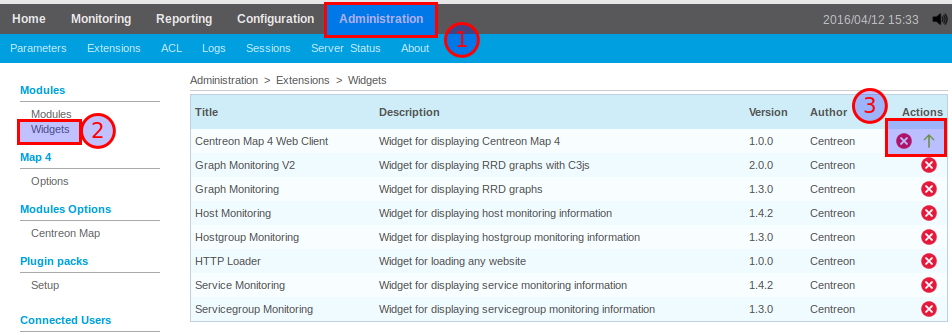
Connect to your Centreon web interface with admin privileges in menu Administration > Extensions

Don’t forget to also update your widget !
Centreon Map 4 Desktop client
If the user’s computer has access to the Internet, the desktop client is automatically updated to the last version corresponding to the server.
For the 4.1 or 4.2 to 4.3 update, you have to manually download and install the client. Find the installers on this download page.